• Stream: A WordPress Plugin to Track and Monitor Changes in the Admin

    Stream: A WordPress Plugin to Track and Monitor Changes in the Admin

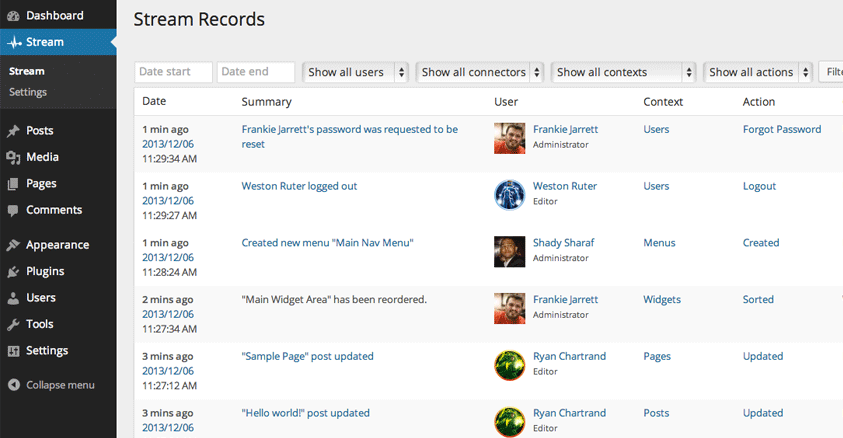
    Have you ever logged into a WordPress site, charged with the task of fixing something, but totally in the dark about what changes had recently been made in the admin? It can sometimes be tough to track down who changed what and when they did it, especially on sites with multiple administrators. Stream is a…

  • Discover Which WordPress Plugins A Site Has Installed With Plugin Checker

    Developed by Earth People, a web development agency based out of Gamla Stan in Stockholm, the WordPress Plugin checker can find which plugins are installed on almost any WordPress site. Unfortunately, this tool doesn’t list all of the plugins it detects. Instead, it looks to see if any of the plugins developed by Earth People…

  • This Week On WPWeekly: Scott Basgaard

    Scott Basgaard will be our live guest on Friday, December 13th at 3PM Eastern time. Scott is currently employed by WooThemes and is one of the pioneers behind WordSesh. We’ll be talking to Scott about WordSesh 2 which recently took place this past weekend. We’ll also find out what he’s up to these days as…

  • WordSesh Recap: Global WordPress Event Pulls 3,000 Unique Viewers From 85 Countries

    WordSesh Recap: Global WordPress Event Pulls 3,000 Unique Viewers From 85 Countries

    WordSesh was like crack for WordPress enthusiasts who joined together on Twitter and eagerly counted down the minutes until sessions began. The event took place over the weekend, kicked off by the DradCast podcast which introduced a catchy new WordSesh rap. In case you missed it, WordSesh presenters cranked out an impressive 24 hours of…

  • WPWeekly Episode 130 – Catching Up With Matt Mullenweg

    In this edition of WordPress Weekly, our special guest was Matt Mullenweg, co-founder of WordPress. After catching up with the headlines, we covered a wide range of topics with Matt such as: Automattic Fighting Back Against DMCA Takedown Abuse Giving The Keynote Speech At The Joomla World Conference Day Matt’s Thoughts On The WordPress Backend…

  • Poedit Adds Pro Support for WordPress Theme and Plugin Translation

    Poedit 1.6 was released earlier this week. For many WordPress developers, Poedit is their go-to app for generating language files for extensions. This release introduces a new Pro version of the app with built-in support for translating WordPress themes and plugins. Poedit 1.6 brings a more polished UI, a completely new translation memory implementation, word…

  • A Look Back At WordPress Through The Years

    Inmotionghosting has a great historical timeline showing images of the front and backend of WordPress starting with 1.0 up to version 3.8. Through these images, you can see the natural progression of features, designs, and layouts WordPress has gone through during the past 10 years. For many within the WordPress community, a post like this…

  • Warning: WordPress.com’s Falling Snow Feature May Make Your Site Inaccessible

    Yesterday, I explained how to make it snow on your website if you have the Jetpack plugin activated. After publishing the article, Mark Root-Wiley commented with a link that explains why the snow animation on websites is not a good idea. According to the website After Gadget which is hosted on WordPress.com, the snowflake animation…

  • Splitdown: A Free Ghost Style Markdown Editor for WordPress

    There are quite a few Ghost fanboys and fangirls in the WordPress community who are attracted to its content editor because of how well it minimizes disruptions in the writing flow. The side-by-side preview eliminates the need to switch back and forth between screens to check formatting in the preview. In the meantime, while the…

  • How to Add Font Awesome Icons to WordPress Menus

    How to Add Font Awesome Icons to WordPress Menus

    Font Awesome is an icon font comprised of 369 scalable vectors that can be customized via CSS to change the size, color, add drop shadows, adjust opacity, etc. Though originally designed for Twitter Bootstrap, the font is available for use within any project. These icons have fewer compatibility issues because they don’t require JavaScript. They…

  • Free WordPress Knowledge Base Theme With bbPress Support

    Free WordPress Knowledge Base Theme With bbPress Support

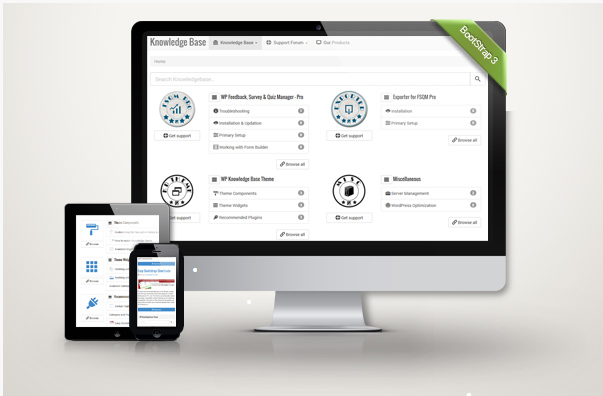
    A knowledge base is one of the best ways to organize information spanning many topics and categories. It’s also useful for providing a first line of support for a product or service. WP Knowledge Base is a new free WordPress theme that lets you quickly set up a multi-product knowledge base using standard WordPress posts…

  • WordCamp Dayton, Ohio 2014 Looking For Speakers

    WordCamp Dayton, Ohio being held on March 7th-8th 2014, has asked for speakers. If you’re interested in speaking at the two day event, you’re encouraged to submit your presentation for review. The event will take place on a Friday and Saturday. Friday March 7th, will be hands-on training, a refresher course for those interested in…

  • Audit Your Alt Attributes with the WordPress Media Ally Plugin

    Delving into the intricacies of web accessibility can be like visiting a remote star system. Many of the terms and practices are unfamiliar to your average blogger or site owner. For this reason, accessibility is an often overlooked aspect of publishing content for the web. Fortunately, there are some experts out there who have created…

  • Make It Snow On Your WordPress Site With Jetpack

    As is tradition on WordPress.com, it’s that time of year where they turn on the snow machine. In order to accomplish the same thing for a self hosted installation of WordPress, you’d need to use a plugin. Great news if you’re already using Jetpack! If you have Jetpack enabled on your site, point your browser…

  • WordPress Dictionary Of Terms For Beginners

    WPBeginner has launched a WordPress glossary filled with commonly used terms and phrases. It’s easy to forget that a lot of people have no idea what a sidebar, widget, or a shortcode is. Syed Balkhi, founder of WPBeginner.com, explains the idea came to him via an attendee at WordCamp Columbus 2012.